


Design · · 5 min read
Bounce and spring easing in plain CSS, with linear()
linear() approximates any easing curve from a list of points, including ones cubic-bezier() cannot draw. The syntax, and the four rules that surprise people.
cubic-bezier() has two control points. It can overshoot, but it cannot oscillate: there is no way to describe a second bounce, or a spring settling over several. linear() can, because it takes as many points as you give it:
.card {
  transition: transform 600ms linear(0, 0.25, 1);
}
Despite the name, linear() is how you get curves that look nothing like a straight line. It became Baseline Widely available on 11 June 2026, having been supported in every major engine since December 2023 — Chrome 113, Firefox 112 and Safari 17.2 — so it needs no fallback for most projects.
This article covers what the arguments mean, the canonicalisation rules that make hand-written values behave oddly, and when a JavaScript animation library is still the right answer.
What the arguments actually are
Each argument to linear() is a control point: a <number> output progress value, optionally followed by one or two <percentage> input progress values.
<linear-easing-function> = linear | <linear()>
linear() = linear( [ <number> && <percentage>{0,2} ]# )
The browser interpolates linearly between those points. Input values are the horizontal axis of the easing graph, output values the vertical. Plain linear is exactly equivalent to linear(0, 1).
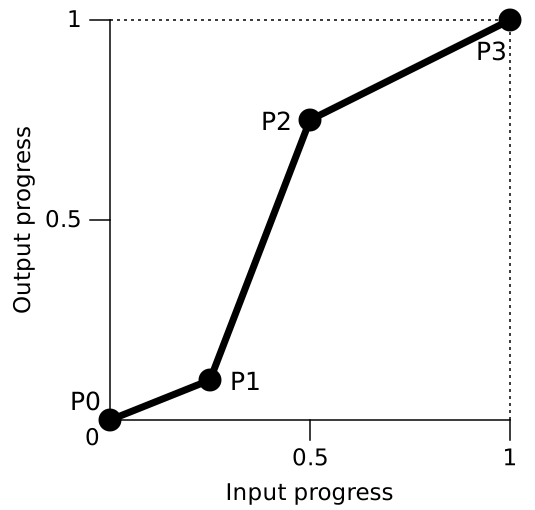
So linear(0, 0.25, 1) moves from 0 to 0.25 over the first half of the duration, then from 0.25 to 1 over the second half. Adding a percentage moves the corner: linear(0, 0.25 75%, 1) spends 75% of the time crawling to 0.25 and the last 25% racing to 1.
The trick that makes it useful is volume. As the spec puts it, "a typical use of linear() is to provide many points to create the illusion of a curve" — enough of them read as a smooth arc, and nothing stops those points going up, down, and up again.
A bounce you can copy
The spec includes a reusable bounce, which is the clearest demonstration of what the function is for:
:root {
  --bounce: linear(
    /* Start to 1st bounce */
    0, 0.063, 0.25, 0.563, 1 36.4%,
    /* 1st to 2nd bounce */
    0.812, 0.75, 0.813, 1 72.7%,
    /* 2nd to 3rd bounce */
    0.953, 0.938, 0.953, 1 90.9%,
    /* 3rd bounce to end */
    0.984, 1 100% 100%
  );
}

.example {
  animation-timing-function: var(--bounce);
}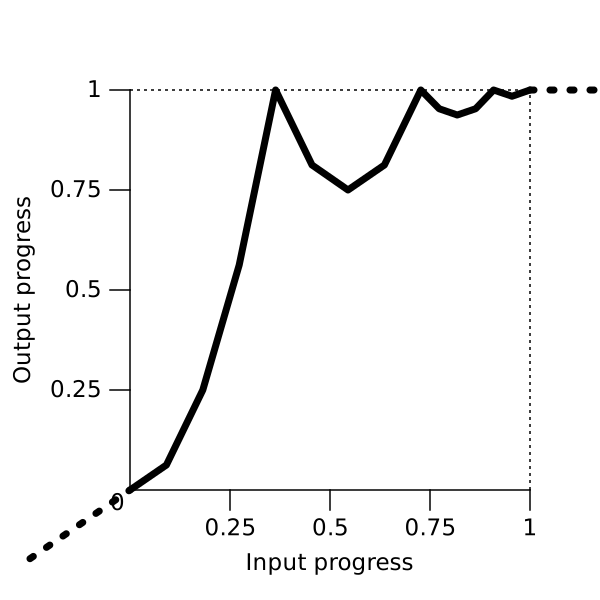
Two details in there are worth stealing. Storing the curve in a custom property means one definition for a whole design system rather than a 200-character value repeated in every rule. And the definition ends 1 100% 100% deliberately: that creates two final control points at the same place, so any input past 1 still outputs 1 — which matters because of the extrapolation rule below.
The spec also notes that more points give a smoother result, "which may be needed for slower animations". A 200ms bounce forgives coarse points; a 2s one does not.
The four rules that catch people out
Hand-editing a generated linear() is where the surprises start. All four behaviours come from the spec's canonicalisation step, which runs at used-value time.
1. Missing inputs are filled in for you. If the first point has no percentage, its input becomes 0; if the last has none, its input becomes 1. Any run of points still without inputs is spaced evenly between the neighbours that have them. This is why linear(0, 0.25, 1) splits the duration in half — not because of anything you wrote.
2. Inputs can never go backwards. If a point's input is smaller than one before it, the browser raises it to the largest preceding input. So linear(0, 1 80%, 0.5 20%, 1) does not rewind: the third point is silently moved to 80%, giving you an instant jump you did not ask for. Keep your percentages ascending.
3. Two percentages on one argument create a pause. linear(0, 0.25 25% 75%, 1) is shorthand for linear(0, 0.25 25%, 0.25 75%, 1) — the value holds still for half the duration. Useful on purpose, baffling by accident.
4. Progress outside your points is extrapolated, not clamped. Write linear(0 20%, 1 80%) and you have defined nothing for the first and last fifths of the duration. The spec does not clamp there: "the trajectory of the nearest two points is continued", so the value shoots below 0 at the start and past 1 at the end. That is exactly why the bounce above pins its last point twice.
When to use it, and when not to
| You want | Use |
|---|---|
| Ease in, ease out, one overshoot | cubic-bezier() — shorter, easier to tune |
| Bounce, wobble, or a spring settling over several oscillations | linear() |
| Discrete jumps: a typewriter, a sprite sheet, a counter | steps() |
| Motion that reacts to velocity, gestures or interruption mid-flight | A JavaScript animation library |
The line to hold is that last row. linear() is a fixed curve sampled from a spring, not a spring. If the animation has to be interrupted halfway and continue naturally from its current velocity — a dragged sheet, a flung card — you still need a physics implementation in script. If it just has to look springy, a curve is cheaper and needs no library.
One more thing worth wiring in: the more elastic the curve, the more it matters that you honour prefers-reduced-motion. A bounce is precisely the kind of motion some people have asked their operating system to remove. The site's guide to designing motion for reduced motion covers how to decide what stays and what changes.
FAQ
Is linear() the same as a spring?
No. It is a polyline that can be shaped to resemble one. There is no mass, stiffness or damping, and no velocity carried across an interruption. Generators that offer "spring" presets are sampling a spring simulation into points at authoring time.
How many points do I need?
Enough that the corners are not visible at the duration you are using. Short animations need fewer. The spec's own bounce uses fifteen arguments.
Does it work in transition as well as animation?
Yes. linear() is an <easing-function>, so it is valid anywhere one is accepted, including transition-timing-function and animation-timing-function.
Can I animate between two different linear() values?
Easing functions are not interpolated between as a curve; changing the timing function swaps it. If you need the curve itself to vary, generate the value in script or switch between custom properties.
Do I still need a fallback?
For most projects, no. It has been supported in all three engines since late 2023 and reached Baseline Widely available in June 2026. Browser support is time-sensitive, so check it against your own targets before dropping a fallback.
Sources
- CSS Easing Functions Module Level 2 — CSS Working Group, Editor's Draft, including the linear() syntax, canonicalisation algorithm and bounce example
- web-features — Baseline status and per-engine versions for
linear() easing
More to read
- AI
AI · · 7 min read
The browser has a language model, and almost no promises about it
The Prompt API puts a LanguageModel class in the page, with structured output, tool calls and a context window you manage. What it guarantees is the interesting part.
- Tech
Tech · · 6 min read
When the tab order stops matching what you see
reading-flow tells the browser to follow the visual order for focus and screen readers instead of the DOM. The seven values, and the thing it deliberately does not fix.