


Design · · 6 min read
Text that sits flush in its box: text-box-trim in every engine
Firefox 154 shipped text-box-trim in August 2026, so all three engines now trim the space above and below text. The keywords, and when it does nothing.
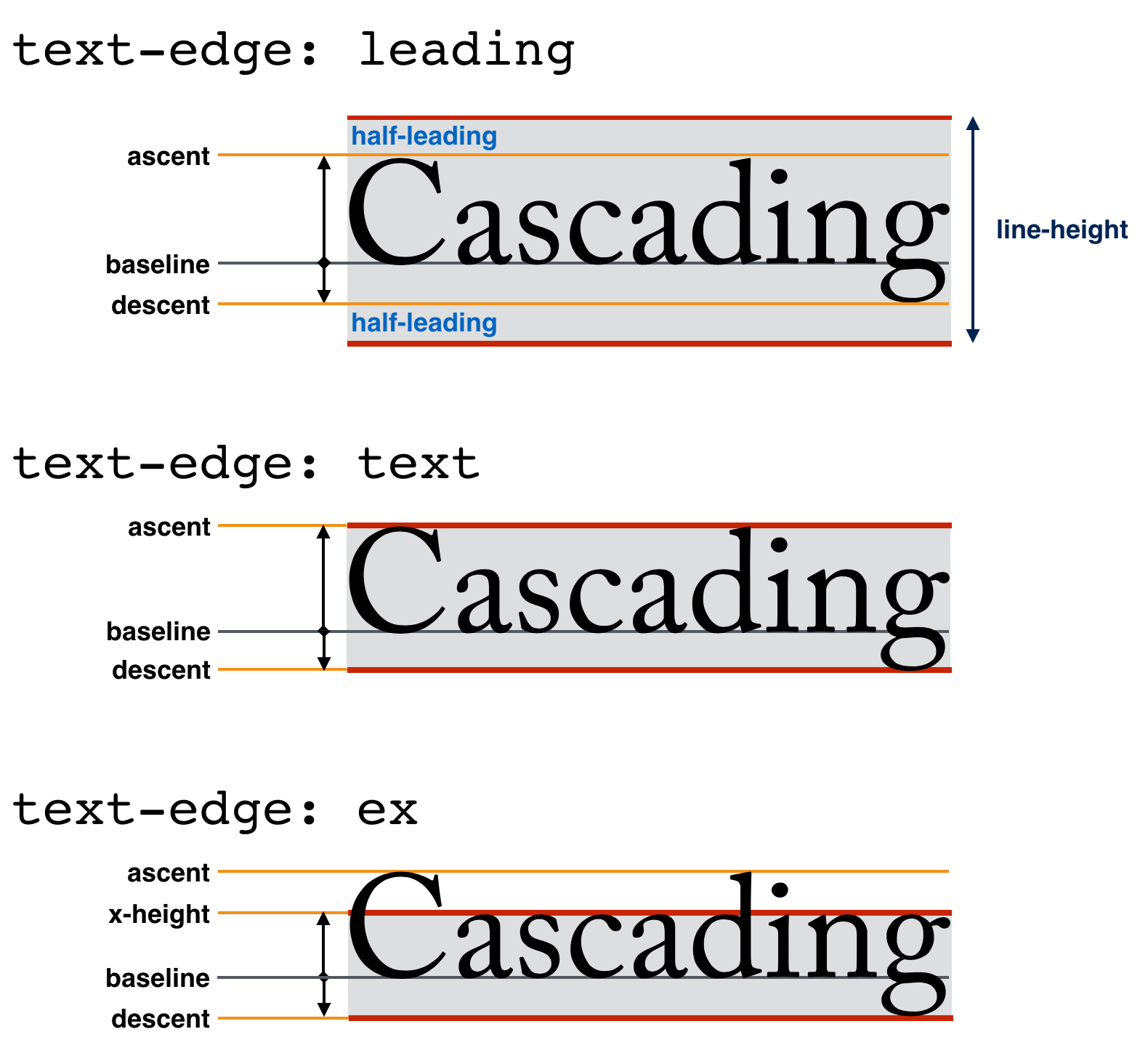
A block of text is taller than the text you can see. Fonts reserve space above the ascender and below the descender, and CSS adds half-leading on top of that. text-box-trim removes it:
.title {
  text-box: trim-both cap alphabetic;
}
The first line's box now starts at the cap height and the last line's ends at the alphabetic baseline, so padding and gaps measure to the letters rather than to the invisible box around them.
Firefox 154 shipped the property on 18 August 2026, joining Safari 18.2 (December 2024) and Chrome 133 (February 2025). The core of the feature now works in every engine. This is what the keywords mean, and the three situations where the declaration is silently ignored.

The two properties and the shorthand
text-box-trim decides which edges to trim. text-box-edge decides which font metric to trim to.
| Property | Values | Initial |
|---|---|---|
text-box-trim | none, trim-start, trim-end, trim-both | none |
text-box-edge | auto, or a <text-edge> pair | auto |
text-box | normal, or the two above in one declaration | normal |
<text-edge> takes an over edge and an under edge, in that order:
- Over edge:
text,cap,ex,ideographic,ideographic-ink - Under edge:
text,alphabetic,ideographic,ideographic-ink
text uses the font's text-over and text-under baselines — effectively its ascent and descent, the tallest and deepest the font says it needs. cap is the top of a capital letter, ex the top of a lowercase x, alphabetic the baseline most Latin letters sit on.
For the usual Latin case, cap alphabetic is what designers mean by "trim to the letters".
Always write both edge keywords
cap and ex are only legal as the over edge. alphabetic is only legal as the under edge. Only text, ideographic and ideographic-ink are legal on both sides, and the grammar reflects that: a <text-edge> is either one keyword from that three, or an explicit pair.
/* Ambiguous — see below */
h1 { text-box: trim-both cap; }

/* Unambiguous: cap height on top, baseline underneath */
h1 { text-box: trim-both cap alphabetic; }
The first one is worth avoiding, because the spec currently reads two ways. The grammar does not admit a lone cap, which would make the declaration invalid and drop it entirely. A note left over from an earlier draft says that when one value is given, both edges use it "if possible; else text is assumed as the missing value", which would instead trim the top to the cap height and leave the font's full descent below. The editor's draft changelog records a resolution to make both values required, so the grammar is probably the current intent — but the two readings produce completely different rendering, and neither is a good thing to rely on.
Write both keywords. It costs one word and removes the question.
Omitting the trim keyword is safe, and it does not fall back to the initial value: text-box: cap alphabetic sets text-box-trim to trim-both, not none.
Three ways it silently does nothing
1. Flex, grid and table containers. The spec is explicit: like ::first-line, text-box-trim "does not apply to, or propagate through, flex, grid, or table formatting contexts". A button laid out with display: flex will not trim its label, and neither will a grid item inherit trimming from a trimming ancestor. Put the property on the element that actually establishes the block layout around the text.
/* No effect — .button is a flex container */
.button { display: flex; text-box: trim-both cap alphabetic; }

/* Works — the trimming element contains the line boxes */
.button { display: flex; }
.button > span { text-box: trim-both cap alphabetic; }
2. Padding or a border in the way. Trimming applies to the first and last formatted line of the box. The spec states that if there is "intervening non-zero padding or borders", there is no effect. A card with padding: 24px on the same element you are trimming will not trim. Trim the inner text element and let the card keep its padding.
3. No line to trim. trim-start needs a first formatted line and trim-end a last one. An empty element, or one whose only child is a block, has nothing to act on.
What it costs you in other scripts
cap, ex and alphabetic measure the typical Latin letter, not the tallest thing the font can draw. Where it defines these metrics, the spec warns that they "are more likely to result in overlap or overflow caused by ascents above the specified metrics (such as for diacritics), so authors using these values need to be careful to provide sufficient spacing for the text, particularly in multi-lingual contexts".
In practice: text in a script with tall or stacked diacritics — Vietnamese is the usual example — can push marks above the cap height and into whatever sits above it. If your content is user-generated or translated, either keep a small amount of padding as headroom, or trim only to text, which uses the font's own ascent and descent and is safe by construction.
ideographic and ideographic-ink exist for CJK typesetting, but at the time of writing only Firefox implements them.
Browser support, and why it is not Baseline yet
Support data below is from MDN's browser-compat-data at the time of writing.
| Part | Chrome | Safari | Firefox |
|---|---|---|---|
text-box, text-box-trim, text-box-edge | 133 | 18.2 | 154 |
cap, ex, alphabetic, text edges | 133 | 18.2 | 154 |
| Applied to an inline box | Not yet | 26.5 | 154 |
ideographic, ideographic-ink edges | Not yet | Not yet | 154 |
Three engines support the property, so the everyday Latin case is usable now. The feature as a whole is still not marked Baseline, because the inline-box case and the ideographic metrics are missing in at least one engine. That distinction matters if you gate on Baseline automatically — the badge is answering a question about the whole feature, not about trim-both cap alphabetic on a block.
There is no fallback to write. Browsers that do not know the property ignore the declaration and you get today's spacing, which is the spacing you have now. If you need the trimmed and untrimmed cases to look different, guard with @supports (text-box-trim: trim-both).
One caveat worth knowing: the spec's property table says text-box-edge inherits, while a note a few lines below says it does not. The changelog records a resolution to make it inherit, so the note appears to be stale, but until that is tidied up it is safer to set both values together in the text-box shorthand on the element you want trimmed rather than relying on inheritance from an ancestor.
FAQ
Is this the same as the vertical trim in design tools?
It solves the same problem: making a text box measure to its letters rather than to the invisible space around them. The difference is that CSS resolves the metric at render time from whichever font actually rendered, so the result survives a font swap, a fallback font or a change of language.
Does it change line-height between lines?
No. It only trims the space above the first formatted line and below the last one. Spacing between lines still comes from line-height.
Should I replace my negative margins with it?
Yes, where it applies. Negative margins tuned to one font break when the font changes or falls back. text-box-trim reads the metric from whichever font actually rendered.
What about the old leading-trim name?
leading-trim and text-edge were the earlier names; the spec renamed them, along with their initial values, in a draft after November 2022. MDN's browser-compat-data has no record of either old name shipping, so there is nothing to migrate.
Sources
- CSS Inline Layout Module Level 3 — the W3C CSS Working Group editor's draft, read from its source in the csswg-drafts repository
- mdn/browser-compat-data — support versions and release dates for
css.properties.text-box,text-box-trimandtext-box-edge - web-platform-dx/web-features — Baseline status for the
text-boxfeature
More to read
- Design
Design · · 6 min read
Container style queries are Baseline. Here's what actually shipped
Style queries became Baseline newly available in May 2026, but only for custom properties. The syntax, the ancestor rule, and the four things that catch people out.
- Design
Design · · 6 min read
Readable text on any background: how CSS contrast-color() works
contrast-color() returns black or white, whichever contrasts more with the colour you pass it. What the spec guarantees, what it refuses to promise, and how to ship it.