


AI · · 6 min read
Prompt recipes for gpt-image-2, straight from OpenAI's own guide
Photorealism, legible in-image copy, transparent logos and sketch-to-render, written as templates you can paste, with the settings that actually change the result.
OpenAI keeps a prompting guide for its image models in the openai-cookbook repository, with the prompts and the resulting images published side by side. It is the most useful reference for gpt-image-2 that exists, and almost nobody reads it, because it looks like a developer notebook. Here is what is in it for designers, rewritten as recipes.
Everything below comes from that guide, read on 20 September 2026. The example images are OpenAI's own published outputs from its repository, not results produced for this article.
The prompt shape that works
OpenAI's first recommendation is an order, not a wording: scene and background, then subject, then key details, then constraints. It also says to name the intended use, because "ad", "UI mock" or "infographic" sets the level of polish the model aims for. For anything complicated, use short labelled lines rather than one long paragraph.
The second recommendation is the one worth taping to your monitor: state what must not change. OpenAI's phrasing for edits is "change only X" plus "keep everything else the same", repeated on every iteration so the image does not drift.
Use: [ad / packshot / UI mock / infographic]
Scene: [where we are, time of day, surface, background]
Subject: [who or what, scale in frame, what they are doing]
Details: [materials, textures, wardrobe, props, colour direction]
Framing: [close-up / wide, eye level / low angle, lens if it matters]
Text: "[exact copy in quotes]" [placement, weight, size]
Do not: [no watermark, no extra text, no logos, no reflow]
Recipe 1: photorealism that does not look retouched
The guide is specific here. Put the word "photorealistic" in the prompt, prompt it as though a real photo is being taken in the moment, and ask explicitly for real texture: pores, wrinkles, fabric wear, imperfections. Then it says the thing that matters more: avoid words that imply studio polish or staging.
It also warns that detailed camera specifications get interpreted loosely, so use lens and film language for the look and the composition, not as a physical simulation.
Create a photorealistic candid photograph of [subject] [doing something ordinary].
Visible skin texture, pores, and wear on clothing and props.
Shot like a 35mm film photograph, medium close-up at eye level, 50mm lens.
Soft daylight, shallow depth of field, subtle film grain, natural colour balance.
Honest and unposed. No glamorisation, no heavy retouching.
That last pair of instructions is doing the real work. "No glamorisation, no heavy retouching" is a negative brief against the house style these models drift towards when left alone.
Recipe 2: copy in the image that survives a client review
Three rules from the guide: put literal text in quotes or capitals, spell out tricky words letter by letter, and use medium or high quality for small text, dense panels and multi-font layouts. Ask for the copy to appear exactly once, verbatim, and say so in those words.
Create a realistic billboard mockup of [product] on a highway at sunset.
Billboard text (EXACT, verbatim, no extra characters):
"[Your line here]"
Typography: bold sans-serif, high contrast, centred, clean kerning.
Ensure the text appears once and is perfectly legible.
No watermarks, no logos.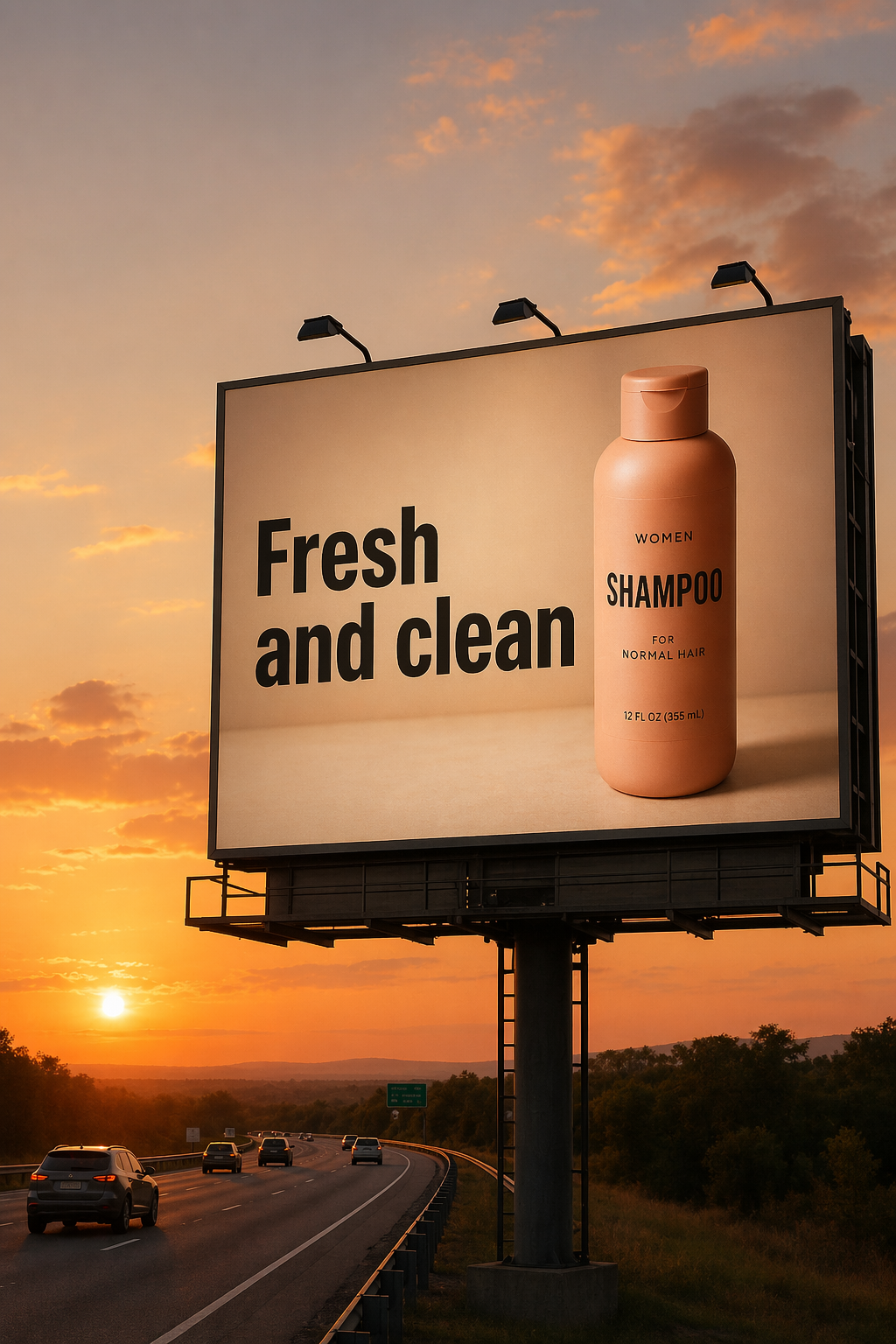
For localisation, the same discipline applies in reverse. OpenAI's translation example asks the model to translate the text in an existing infographic and change nothing else, which keeps typography style, placement, spacing and hierarchy intact rather than rebuilding the layout.
Recipe 3: a logo or product cutout with real alpha
Transparent backgrounds are in preview for gpt-image-2. Two settings and one paragraph of prompt:
background="transparent"output_format="png"(the default) or"webp". JPEG cannot hold transparency.- Omit compression for PNG output, and keep the returned file as PNG or WebP so the alpha channel survives your pipeline.
The prompt has to ask for isolation explicitly, because the model will otherwise invent a backdrop:
[Subject] isolated on a fully transparent background.
Centred, generous padding, crisp silhouette, clean alpha edges, no halos or fringing.
Preserve geometry and label legibility exactly.
No solid backdrop, no scenery, no checkerboard, no drop shadow, no watermark.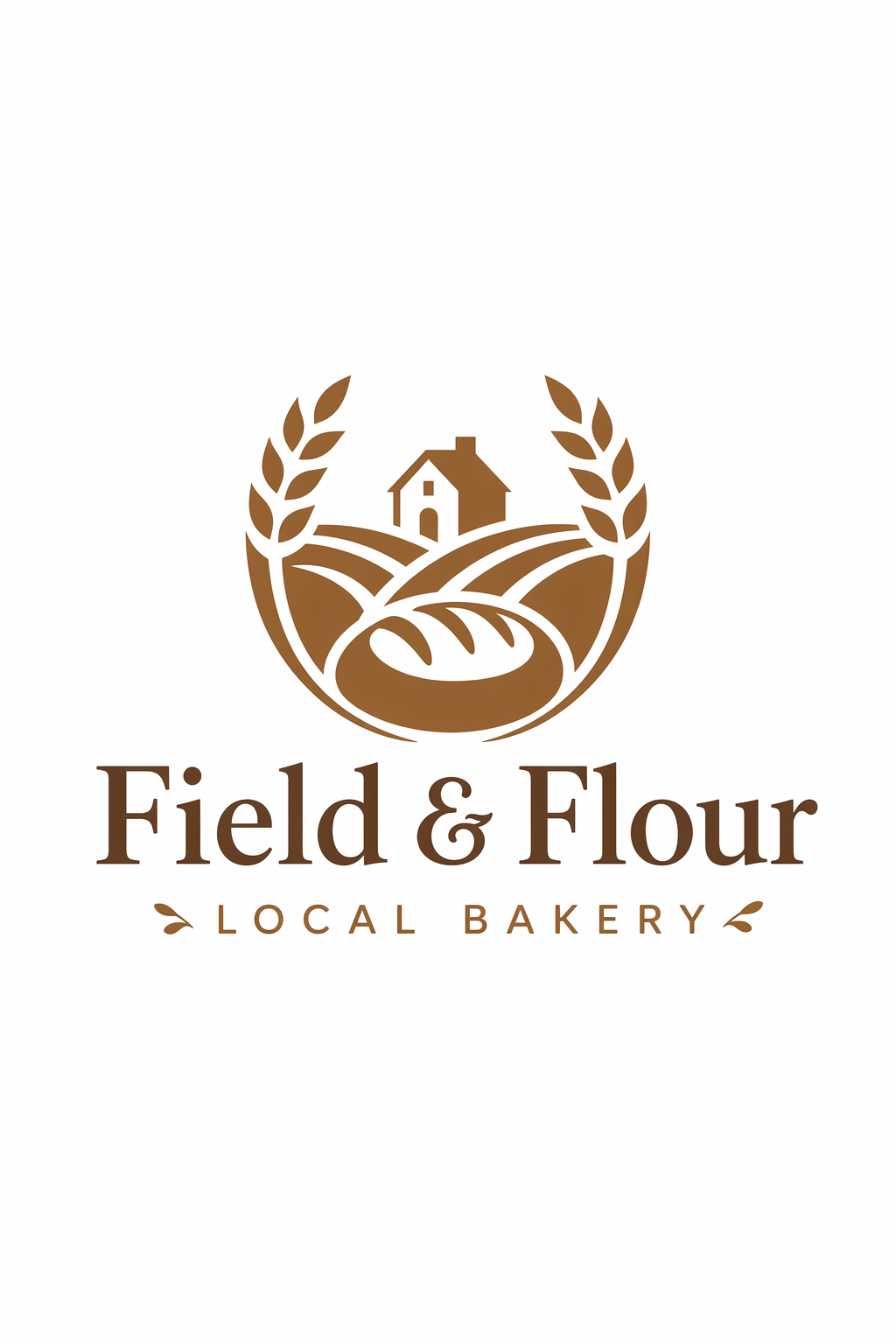
Two details from the guide that are easy to miss. You can pass n=4 and get four variations from one prompt, which is the right way to explore a mark. And on edits, you have to repeat the transparency instruction every time, or a later step will quietly paint a background back in.
For logos specifically, OpenAI's advice is to describe the brand personality and the use, then ask for a simple, original mark with a strong silhouette and balanced negative space that holds up small. Treat what comes back as a sketch to react to, not as identity work that is finished.
Recipe 4: sketch to render
The one that earns its place in a real project. Keep the drawing's geometry, add plausible material and light:
Turn this drawing into a photorealistic image.
Preserve the exact layout, proportions, and perspective.
Choose realistic materials and lighting consistent with the sketch intent.
Do not add new elements or text.
"Do not add new elements or text" is the line that stops the model from improving your concept into someone else's.
The settings that change the picture
| Setting | What it does | When to change it |
|---|---|---|
quality | low, medium, high | Start at low for volume and speed. Move to medium or high for small text, dense panels, close-up portraits and identity-sensitive edits |
size | Any size within the model's constraints | Long edge under 3840px, both edges multiples of 16, ratio no wider than 3:1, total pixels between 655,360 and 8,294,400 |
background | transparent for cutouts | Pair with PNG or WebP output |
n | Number of variations | Exploration, especially marks and layouts |
One inconsistency worth knowing about. The guide's model table says input_fidelity does not apply to gpt-image-2 because its output is already high fidelity, while several of the edit examples further down still pass input_fidelity="high". If you are building a repeatable workflow, follow the table and test whether the parameter changes anything for you.
Three mistakes the guide implies
- Prompting a finished ad as one long paragraph. The guide favours short labelled segments for complex requests. Long prose hides the constraint you actually care about.
- Judging typography at low quality. Text legibility is tied to the quality setting, so a cheap pass tells you about composition, not about type.
- Overloading the first prompt. OpenAI's recommendation is a clean base prompt followed by small single-change follow-ups: warmer light, remove the extra tree, restore the original background. Debugging one variable at a time is faster than rewriting a wall of text.
FAQ
Do these prompts work on other models?
The structure does, since scene, subject, detail, constraint is just a clear brief. The settings do not: background="transparent", n and the size rules are OpenAI parameters. Google's models take aspect ratio and resolution through a different configuration, and open models take theirs on the command line.
Which quality setting should I default to?
OpenAI suggests starting at low for latency-sensitive and high-volume work and comparing medium or high before shipping anything with small text, dense information or a close-up face. That is a sensible default for exploration too: cheap while you are deciding, expensive only once you know what you want.
Can I use the outputs commercially?
That depends on your OpenAI account terms rather than on the prompting guide, so check them rather than taking an article's word for it. For open-weight models, the equivalent question has a different and often surprising answer, which is covered in what the open image model licences actually say.
Why does my cutout have a grey checkerboard in it?
Because the model drew one. The guide tells you to exclude checkerboards explicitly in the prompt, which only makes sense once you have seen a model render the transparency pattern as literal pixels.
Sources
- OpenAI, GPT Image Generation Models Prompting Guide, read 20 September 2026
- openai-cookbook repository, source of the published example outputs used above
More to read
Design · · 7 min read
A scoring sheet for AI images, borrowed from OpenAI's own evals
OpenAI publishes the rubrics it grades image models with. Stripped of the code, they make a sharper art direction checklist than any gut call in a review.
AI · · 6 min read
Can you use it in client work? What the open image model licences actually say
FLUX and Qwen-Image are free to download and not equally free to use. Which weights are Apache 2.0, which are non-commercial, and the clauses people misread.