


AI · · 7 min read
Which AI image model for which job, going by the makers' own docs
GPT Image, Nano Banana, FLUX.2 and Qwen-Image, compared on what their makers actually document: sizes, editing, text, where they run and what they cost you.
Four families of image model cover most creative work right now, and each one is documented well enough that you can choose between them without guessing. The short version: reach for gpt-image-2 when the image has to carry real copy, a clean cutout or a likeness that cannot drift. Reach for Nano Banana 2 or Pro when you need unusual formats, 4K, or a picture of something that changed this week. Reach for FLUX.2 [klein] when you want generation and editing running on your own GPU in under a second. Reach for Qwen-Image when Chinese typography is in the layout.
This piece is built from documentation the makers publish and keep current: OpenAI's prompting guide in the openai-cookbook repository, Google's Nano Banana quickstart in the google-gemini cookbook, the FLUX.2 repository from Black Forest Labs, and the Qwen-Image repository from the Qwen team. All were read on 20 September 2026. Nothing here comes from images generated for this article: these are documented capabilities and the makers' own published examples, not measured results from a controlled test. Where a claim is a maker's own claim about its own model, it says so.
The one-table version
| Model | Maker positions it for | Output sizes | Editing | Where it runs |
|---|---|---|---|---|
gpt-image-2 | Default for new work: highest-quality generation and editing, text-heavy images, photorealism, compositing, identity-sensitive edits | Any size inside a set of constraints, up to just under 3840px on the long edge | Yes, including multi-image compositing and transparent-background output (preview) | OpenAI API |
gpt-image-1-mini | Cost and throughput: batches, ideation, previews, draft assets | 1024x1024, 1024x1536, 1536x1024 | Yes | OpenAI API |
Nano Banana Pro (gemini-3-pro-image-preview) | Flagship: reasoning before it draws, 4K, complex typography, high-fidelity multi-image composition | 1K, 2K, 4K, ratios from 1:8 to 8:1 | Yes, conversational | Gemini API |
Nano Banana 2 (gemini-3.1-flash-image) | The versatile middle: speed, wide ratios, Search and image grounding, video-to-image | 512px, 1K, 2K, 4K | Yes, conversational | Gemini API |
Nano Banana 2 Lite (gemini-3.1-flash-lite-image) | Fastest and cheapest, with a free tier | 512px, 1K | Yes, up to 3 input images | Gemini API |
| FLUX.2 [klein] 4B | Real-time work on consumer hardware | Set by you at inference | Yes, single and multi-reference | Your GPU, around 8GB VRAM |
| FLUX.2 [dev] | Maximum quality with no latency constraint | Set by you at inference | Yes, single and multi-reference | Your GPU, H100 class, or quantised |
| Qwen-Image / Qwen-Image-Edit | Complex text rendering, especially Chinese, and precise editing | Preset ratios from 1:1 to 16:9 | Yes, with multi-image input | Your GPU, or Qwen Chat |
When the image has to carry text
Every maker in this list now claims typography as a strength, so the useful question is what kind of typography.
OpenAI's guide names text-heavy images as one of the reasons to pick gpt-image-2 over its older models, and its advice is specific in a way that tells you how the model behaves: put literal copy in quotes or capitals, spell out brand names letter by letter when they are unusual, and use the medium or high quality setting for small text, dense information panels and multi-font layouts. That last line is the tell. Text quality is tied to the quality setting, so a cheap draft pass will not show you what the finished poster looks like.
Google documents a different trick. Nano Banana 2 and Pro generate and translate text, diagrams and infographics in dozens of languages, and Google's own example takes an infographic it just made in Spanish and asks for it in Japanese with everything else kept the same. If you localise campaign artwork, that is the workflow, and it is worth testing against your own layouts before you rebuild them by hand.
Qwen-Image is the one to look at for Chinese. The team describes it as a 20B model with "significant advances in complex text rendering and precise image editing", with the strongest results in Chinese, and the December 2025 release notes for Qwen-Image-2512 claim better layout and higher accuracy in text and image composition again. Those are the makers' claims, not a measured comparison, but no other maker in this list singles out CJK the same way.
When you need a specific format
This is where documentation beats vibes, because the constraints are hard numbers.
gpt-image-2 accepts any size you pass as long as the long edge is under 3840px, both edges are multiples of 16, the ratio is no wider than 3:1, and the total pixel count sits between 655,360 and 8,294,400. OpenAI adds a warning worth taking seriously: above 2560x1440 the results get more variable, so treat 4K as experimental.
Google's models work from a fixed list instead, and the quickstart prints the pixel dimensions for each ratio, which is more useful than the ratio itself. A 16:9 image is 1344x768 at 1K. A 4:5 image, the format most social feeds favour, is 896x1152. The extreme panoramic ratios, 1:4 through to 8:1, need Nano Banana 2 or Pro; the Lite model stops at 21:9.
If you want to plan artwork around those ceilings, the sizes are collected in what AI image models can actually output.
When you want it on your own machine
FLUX.2 is the family to know here. Black Forest Labs released FLUX.2 [dev], a 32B model that does text-to-image and single or multi-reference editing, on 25 November 2025, and the [klein] family on 15 January 2026, which it describes as generating and editing images in under a second and fitting on consumer hardware: around 8GB of VRAM for the 4B model, which puts it on an RTX 3090 or 4070.
Their own recommendation table is refreshingly blunt. Use klein 4B, 9B or 9B KV for real-time and interactive work, klein Base or FLUX.2 [dev] for fine-tuning and LoRA training, and FLUX.2 [dev] when you want maximum quality and do not care how long it takes.
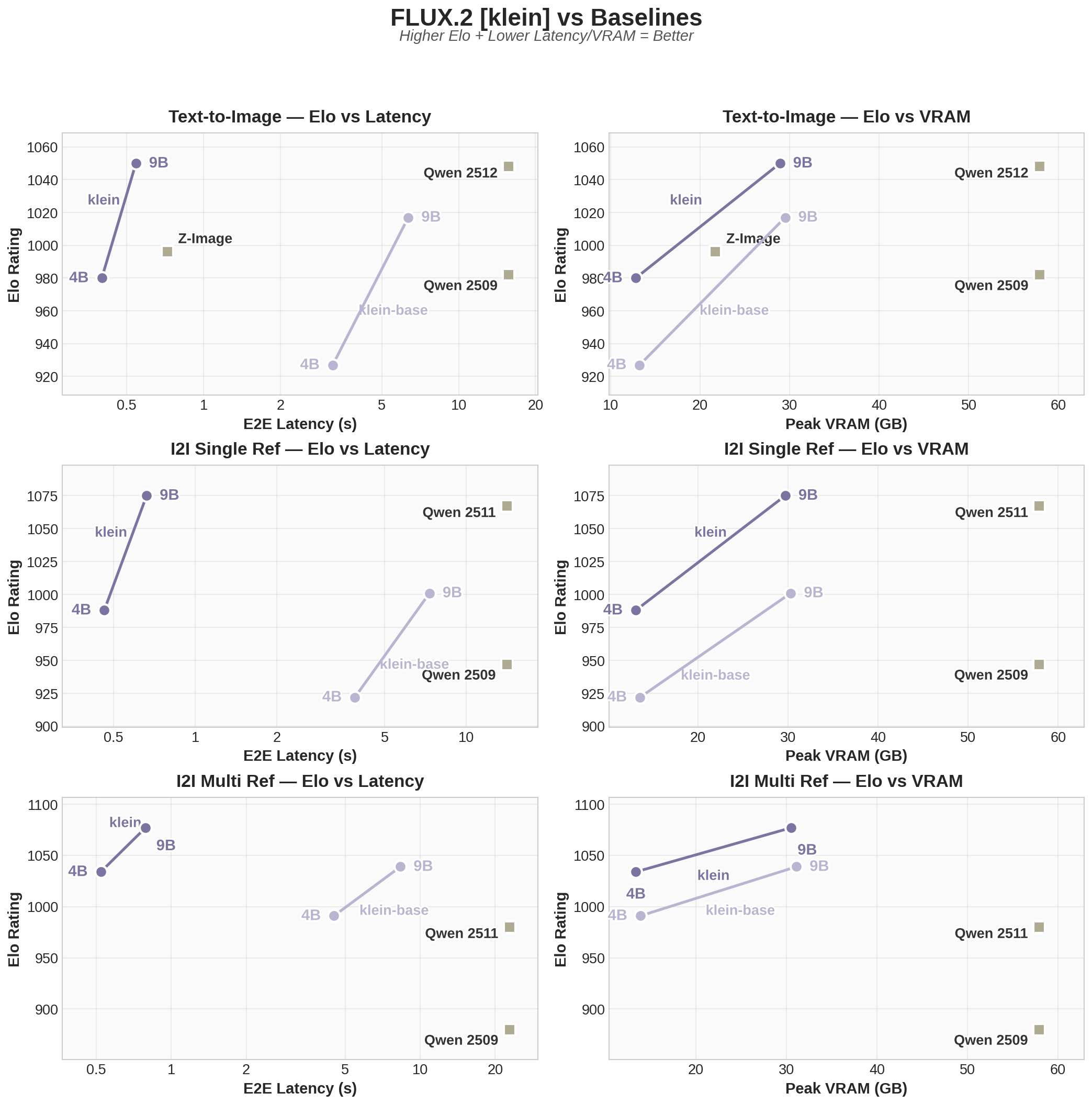
Read that chart as what it is: a maker plotting its own models against baselines it chose. It is still the only published quality-versus-latency picture for these weights, and the shape of the trade-off is the part to take away, not the exact positions.
There is a licence catch, and it is the thing most designers get wrong. Only the 4B klein models are Apache 2.0. The 9B models and FLUX.2 [dev] ship under the FLUX Non-Commercial License. Qwen-Image, by contrast, carries a plain Apache 2.0 licence in its repository. The distinction between licensing the model and owning the picture it made is covered in what the open image model licences actually say.
When the image has to be true
One capability has no equivalent in the other families. Nano Banana 2 and Pro can call Google Search while generating, so Google's own example asks for a five-day Tokyo weather chart and gets current numbers, with the sources attached to the response. Nano Banana 2 goes further and searches for reference images to ground a generation, which Google offers for specific species, landmarks and objects.
For an illustrator drawing something they cannot photograph, that changes the failure mode. A plausible-looking wrong bird becomes a gradable, checkable bird.
What the docs will not tell you
Documentation is good at capabilities and silent about taste. Nothing in these repositories tells you which model draws hands you can print, whose skin texture survives a 400% crop, or which one quietly centres every composition. Those are judgements you have to make on your own work, with your own references, and they change with every release.
So use the docs the way you would use a spec sheet for a lens: it tells you what fits, what it weighs and what it costs. It does not tell you whether you like the pictures.
FAQ
Is gpt-image-2 better than Nano Banana Pro?
Nobody can answer that from documentation alone, and any article that does is guessing. What the docs support is narrower: gpt-image-2 is OpenAI's recommended default for its own highest-quality work, Nano Banana Pro is Google's flagship with 4K and reasoning before generation, and only Google's models can ground an image in a live web search. Pick on the capability you need, then judge quality on your own brief.
Can I still use gpt-image-1?
OpenAI lists it as legacy compatibility only and recommends moving new work to gpt-image-2, keeping the older models while you validate prompt migrations. If your pipeline depends on exactly reproducible outputs, that migration is worth scheduling rather than deferring.
Which of these can I run without an API bill?
FLUX.2 [klein] 4B and Qwen-Image, both on your own hardware, both under permissive licences. Nano Banana 2 Lite also has a free tier, per Google's quickstart, though the terms sit with your API account rather than with the model.
Does any of this cover Midjourney or Firefly?
No. This comparison only includes families whose makers publish detailed technical documentation that anyone can open and check, which is why it stops at four. Treat it as a chooser among those four, not as a ranking of the whole field.
Sources
- OpenAI, GPT Image Generation Models Prompting Guide, read 20 September 2026
- Google, Get started with Nano Banana models, read 20 September 2026
- Black Forest Labs, FLUX.2 repository, read 20 September 2026
- Qwen, Qwen-Image repository, read 20 September 2026
- FLUX Non-Commercial License v2.1
More to read
- Tools
Tools · · 8 min read
What your browserslist query is actually targeting
defaults quietly includes Opera Mini and KaiOS, and last 2 versions still includes IE 11. What each query resolves to, and the Baseline queries that replace them.
Design · · 6 min read
Masonry finally shipped in CSS. It is called grid lanes
Safari ships display: grid-lanes, the CSS Working Group's answer to masonry. The syntax, the flow-tolerance property, and the reading-order trap.