


AI · · 8 min read
Z-Image runs on a 16GB card. Turbo is the variant to be careful with
Tongyi-MAI's 6B open model ships in four variants. Its own table rates Turbo's quality Very High and its diversity Low, and that trade decides which you want.
If you want one open image model sitting on your own machine, download Z-Image-Turbo to make a single finished-looking picture fast, and the plain Z-Image when you need twenty different ideas from one brief. That is not a hedge. It is the trade the Tongyi-MAI team prints in its own model table, where Turbo scores Very High on visual quality and Low on diversity, and the undistilled Z-Image scores High and Medium.
It is easy to lead with this model's leaderboard placement. The more useful number for a designer is the diversity column, because it predicts what happens on the fifth image rather than the first.
Everything below comes from the Z-Image repository, read on 22 September 2026. The showcase images are the team's own picks, not a controlled test, and nothing here was generated for this article.
What it actually is
Z-Image is a family of image models with 6B parameters, built on what the team calls a Scalable Single-Stream DiT, in which text, visual semantic tokens and image tokens are concatenated into one input stream. Six billion is small. FLUX.2 [dev] is 32B and HunyuanImage-3.0 is 80B, which is why the biggest open model needs a datacentre and this one does not.
The repository claims Turbo "fits comfortably within 16G VRAM consumer devices", and links a community project, stable-diffusion.cpp, with a guide to running Z-Image on a GPU with only 4GB of VRAM. The repository carries an Apache 2.0 licence file. Weights live on Hugging Face and ModelScope, which set their own terms, so check those before client work; the distinction between a permissive model licence and the rights to the picture is covered in what the open image model licences actually say.
The four variants, read as a design decision
| Variant | Steps | Guidance | Job | Visual quality | Diversity | Available |
|---|---|---|---|---|---|---|
| Z-Image-Turbo | 8 | Off | Generation | Very High | Low | Yes |
| Z-Image | 50 | On | Generation | High | Medium | Yes |
| Z-Image-Omni-Base | 50 | On | Generation and editing | Medium | High | To be released |
| Z-Image-Edit | 50 | On | Editing | High | Medium | To be released |
The quality and diversity ratings are the team's own, from the Model Zoo table in the repository. Two of the four are still marked "To be released", so a piece of writing that tells you to edit images with Z-Image-Edit is describing something you cannot download yet.
Turbo is a distilled model: the team compressed a 50-step process into 8, using a method they call Decoupled-DMD, then post-trained it with reinforcement learning. Distillation is what buys the speed, and it is also what costs the diversity. A distilled model has been taught the shortest route to a good answer, so it keeps taking it.
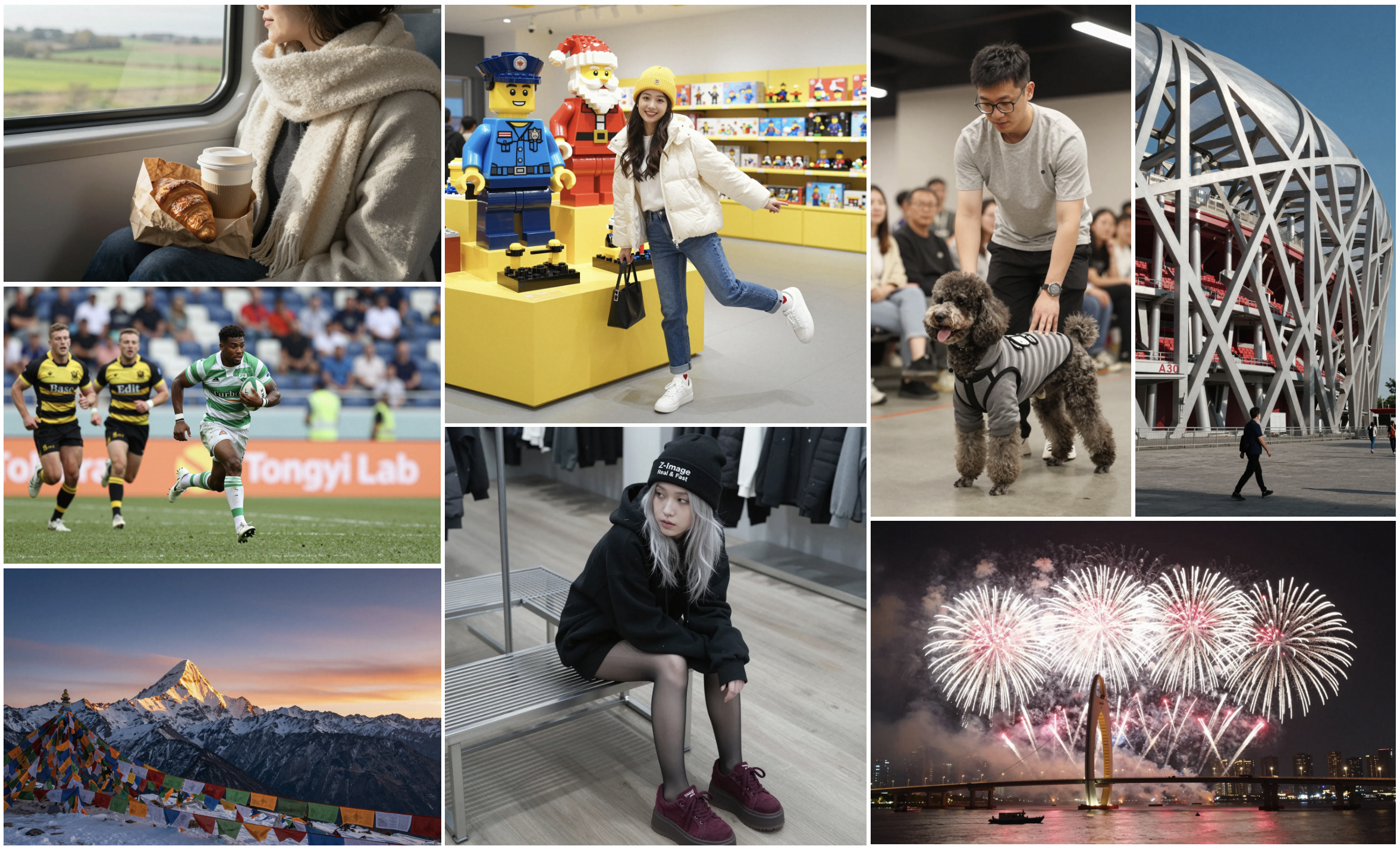
Why "Low diversity" is the line that matters
Think about what you actually ask an image model to do in a working week. Three routes for a landing page. Six thumbnails for a client to react to. A set of twelve, each different enough to sit next to each other in a deck.
A low-diversity model will give you twelve very well made versions of one idea. Same composition instinct, same light, same face type, same warm grade. You will notice it on the contact sheet, not in any single frame, and it is exactly the failure described in why AI images read as AI: unspecified decisions get filled with an average, and a distilled model has a narrower average than the model it came from.
The undistilled Z-Image is the one the team describes as "well-suited for creative generation, fine-tuning, and downstream development", supporting "a wide range of artistic styles, effective negative prompting, and high diversity across identities, poses, compositions, and layouts". It takes 50 steps instead of 8. For a moodboard, pay the time.
The settings the repository actually recommends
For the full Z-Image model, the repository publishes recommended parameters, and they are unusually specific:
- Resolution: 512×512 to 2048×2048, described as total pixel area at any aspect ratio, so you spend a pixel budget rather than pick from a menu
- Guidance scale: 3.0 to 5.0
- Steps: 28 to 50
- Negative prompts: "Strongly recommended for better control"
- CFG normalisation: off for general stylism, on for realism
That last one is the interesting switch. One flag moves the model between a stylised register and a photographic one, which is a decision most models make you argue for in words.
For Turbo the instructions invert. Guidance must be set to 0, because "Guidance should be 0 for the Turbo models", and the step count is 9 in the example, with a comment noting this "actually results in 8 DiT forwards". Guidance is not a dial you still have on Turbo, which is another way of saying the same thing the diversity rating says.
The total pixel area rule is worth holding next to the fixed menus other makers ship, which are laid out in the sizes AI image models can actually give you.
Text in the image, in two scripts
Bilingual text rendering, English and Chinese, is one of the three things the team claims Turbo excels at. The showcase below is their evidence for it.
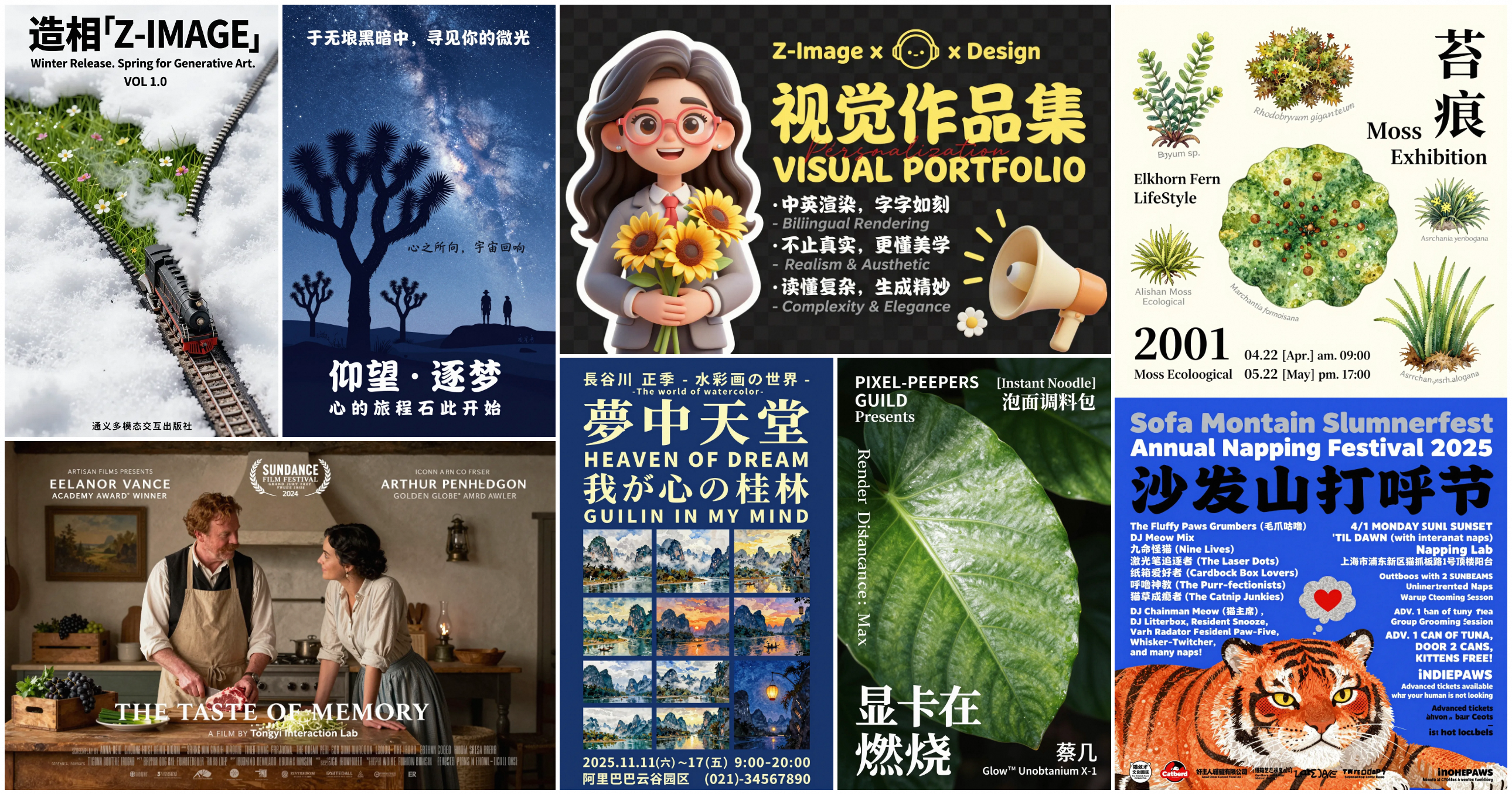
Now read the English in that image rather than looking at it. The Chinese headlines are clean. The English is not: the festival poster announces a "Sofa Montain Slumnerfest", the film credits include "ARTHUR PENHLDGON", and the portfolio cover, which is advertising the model's own bilingual rendering, sets the word "Biliingual". These are the maker's chosen showcase images, so treat that as the ceiling rather than the average.
The practical rule that falls out: headline-length Chinese is plausible, long English body copy is not, and either way you are setting the real type yourself. The sign-off process is the same as for every other model, and how to check CJK copy in a generated image does not change because this one is smaller.
The model's own example prompt is instructive in itself, and it is the maker's, not mine:
Young Chinese woman in red Hanfu, intricate embroidery. Impeccable makeup,
red floral forehead pattern. Elaborate high bun, golden phoenix headdress,
red flowers, beads. Holds round folding fan with lady, trees, bird. Neon
lightning-bolt lamp (⚡️), bright yellow glow, above extended left palm.
Soft-lit outdoor night background, silhouetted tiered pagoda (西安大雁塔),
blurred colorful distant lights.
Note the shape: no camera specs, no "8K masterpiece", no adjectives about quality. It is a list of nouns with materials and positions attached, and a named light source. That is how these prompts are built.
About the leaderboard rank
The repository states that on 8 December 2025, Z-Image-Turbo "ranked 8th overall on the Artificial Analysis Text-to-Image Leaderboard", making it the top open-source model, and reproduces the leaderboard.
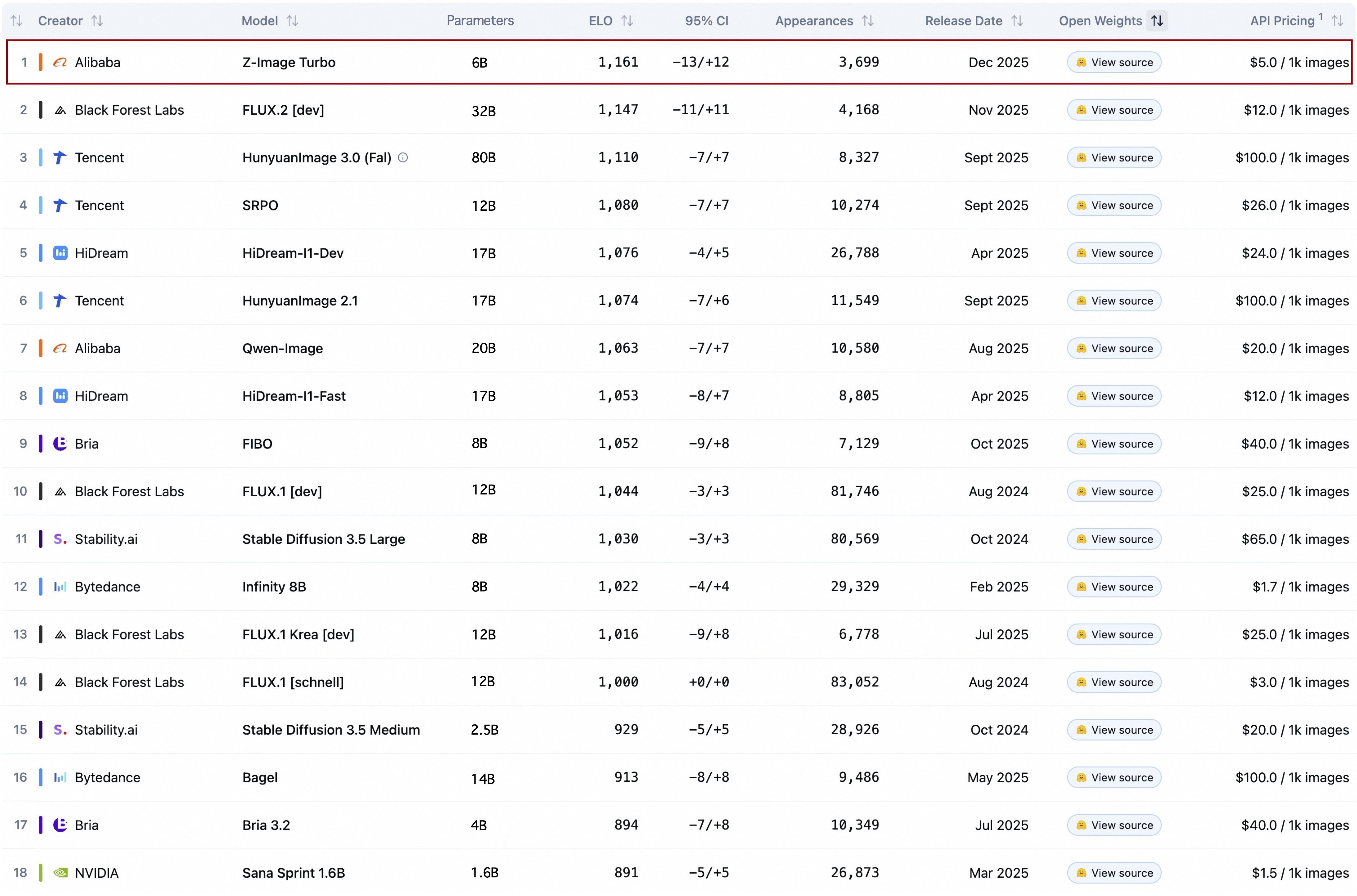
The parameter column is the part to look at. In that snapshot a 6B model sits above a 32B one and an 80B one, which is the actual news here: for the work most designers do, the size of the model stopped being the thing that decides quality.
Two cautions. It is a maker reporting its own placement, and the date is December 2025, which is nine months before this article. Leaderboards move. The durable facts here are the parameter count, the VRAM figure, the licence file and the published settings, because those do not change when someone else ships a model.
Who should actually download this
- You have a gaming GPU and want to stop paying per image. Start with Turbo, and accept that your set will look related.
- You need options, not one picture. Use the full Z-Image at 28 to 50 steps with negative prompts.
- You want to fine-tune on your own illustration style. The table rates Z-Image and Omni-Base as easy to fine-tune, and Turbo as not applicable. Distilled models are not the ones you train on.
- You need editing. Wait, or use something else. Z-Image-Edit is announced, not released.
FAQ
Is Z-Image better than FLUX.2 or Qwen-Image?
Different question to ask. It is smaller and cheaper to run than either, which for most designers matters more than a ranking. If you want the cross-maker comparison on documented capabilities, which AI image model for which job covers it.
Can I really run it on 4GB of VRAM?
The repository links a community guide for exactly that, using stable-diffusion.cpp rather than the official PyTorch path. Expect it to be slow, and expect to lose features that the main pipeline provides.
Does the diversity rating mean Turbo is worse?
No. It means Turbo is narrower. For a single hero image where you already know what you want, narrow is an advantage, because the model wastes fewer attempts on interpretations you did not ask for.
What is the Prompt Enhancer?
A component the repository says gives the model reasoning, so it can "transcend surface-level descriptions and tap into underlying world knowledge". In practice that means your short prompt gets expanded before it is drawn. Useful when you are exploring, dangerous when you have written a precise brief, for the reasons set out in the rewrite trap.
Sources
- Tongyi-MAI, Z-Image repository, read 22 September 2026, source of the model family description, the Model Zoo table, the recommended parameters and the showcase images above
- Z-Image LICENSE file, Apache License 2.0
- stable-diffusion.cpp, How to Use Z-Image on a GPU with Only 4GB VRAM, the community guide linked from the repository
- Black Forest Labs, FLUX.2 repository, for the 32B parameter comparison
More to read
Design · · 7 min read
Telling an image model where to put things
You cannot hand an image model coordinates. You can give it a deliverable, a viewpoint, a placement list and a canvas, and those four do most of the work.
AI · · 7 min read
The largest open image model is Tencent's, and its own chart shows where it loses
80 billion parameters, reasoning before it draws, and three obstacles: a datacentre-sized hardware bill, a licence that excludes three regions, and maker-run evals.